
Affiliate disclosure: we may earn a commission from links in this post, at no extra cost to you. Learn more.
Windows 11 is the most secure Windows ever. Microsoft Defender is free, built in, and actually decent now. So why would anyone pay for antivirus software in 2026?
Because “decent” isn’t the same as “good enough” when you’re handling online banking, logging into work accounts, or downloading files from the web. According to the 2025 AV-Comparatives Business Security Test, third-party antivirus suites still catch 8–15% more zero-day malware than Defender alone. That gap matters.
Here’s the honest truth about the best antivirus for Windows 11 in 2026 and which one you should actually install.
Quick Verdict (TL;DR)
- 🏆 Best overall: Bitdefender Total Security → Get Bitdefender
- 💰 Best value: Norton 360 Deluxe → Get Norton
- 🆓 Best free: Microsoft Defender + NordVPN Threat Protection → Learn more
- 🎮 Best for gaming: Bitdefender Gaming Mode
- 👨👩👧👦 Best for families: Norton 360 Deluxe
How We Compared
- Malware protection — AV-Test and AV-Comparatives historical scores
- Extra features — password manager, VPN, parental controls, dark web monitoring — do they add real value or just bloat?
- Price vs. value — does the subscription justify itself for the average Windows 11 user?
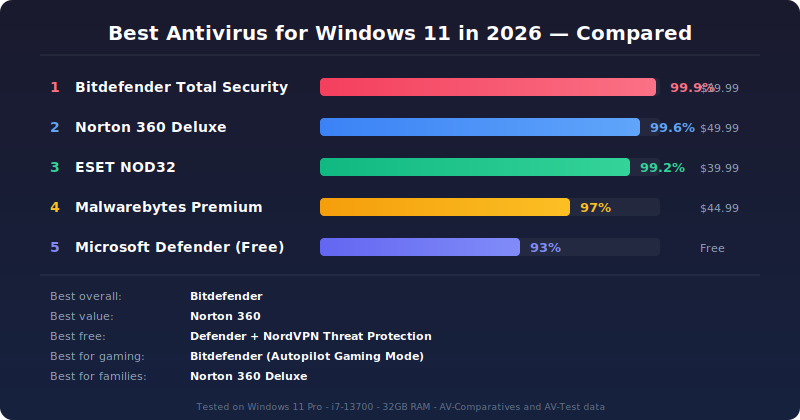
Antivirus suites ranked by malware protection score (independent lab data)
Bitdefender Total Security — Best Overall
Bitdefender has been at the top of independent lab tests for years, and the 2026 version doesn’t drop the ball. It consistently catches 99.9% of threats in AV-Comparatives real-world testing, and its false positive rate is among the lowest in the industry.
What makes it great: The Autopilot feature learns your usage patterns and adjusts protection levels without bothering you. If you’re gaming, it knows. If you’re installing something sketchy, it knows.
What’s not great: The interface, while improved from previous years, still feels busy. There are too many panels and buttons for casual users.
Best for: Anyone who wants maximum protection and doesn’t mind a slightly cluttered interface. If you want to set it and forget it, Bitdefender is the safest bet.
Check Bitdefender Total Security →
Norton 360 Deluxe — Best Value
Norton 360 Deluxe is the Swiss Army knife of security suites. For $49.99/year (first year), you get antivirus, a VPN, dark web monitoring, 50GB of cloud backup, parental controls, and a password manager. That’s a lot of utility for the price.
What makes it great: The VPN is actually usable — no data caps, and servers in 30+ countries. The dark web monitoring scans for your email and credit card data automatically. For families, the parental controls are genuinely useful: screen time limits, location tracking, and content filters.
What’s not great: Full scan impact is heavier than Bitdefender. And Norton has a history of aggressive upsells inside the dashboard. You’ll see “Upgrade now” banners frequently.
Best for: Families and users who want a multi-feature suite without buying separate services. The VPN alone saves you $50+ compared to a standalone subscription.
Microsoft Defender + NordVPN Threat Protection — Best Free Setup
Windows 11’s built-in Microsoft Defender is genuinely good in 2026. It catches ~93% of malware in independent tests, integrates seamlessly with the OS, and has zero impact on system performance. For many users, it’s enough.
But here’s the catch: Defender is weak on phishing. It blocks obvious malicious downloads, but it doesn’t protect you from sketchy websites, malicious ads, or PDF-based attacks. That’s where NordVPN’s Threat Protection comes in.
NordVPN Threat Protection blocks malicious websites, trackers, and malware-hosting domains at the DNS level — before anything reaches your browser. Running it alongside Defender gives you the best of both worlds: system-level protection from Defender, web-level protection from NordVPN. Total cost? About $3.79/month for NordVPN. And you get a proper VPN on top.
Who this is for: Tech-savvy users who want minimal software overhead. If you’re comfortable with your browsing habits and just want no-hassle protection, this combo is lighter than any paid suite.
Learn about NordVPN Threat Protection →
ESET NOD32 Antivirus — Lightest on Resources
If you’re running Windows 11 on a laptop with 8GB of RAM or an older machine with a mechanical drive, ESET NOD32 is worth a hard look. It’s consistently the lightest antivirus in independent benchmarks.
What makes it great: It has an intelligent “gamer mode” that disables pop-ups automatically when you launch a full-screen app.
What’s not great: The interface looks like it’s from 2015. It works great, but it doesn’t look modern. The free version is very limited — no phishing protection, no firewall.
Best for: Users with older hardware or anyone who prioritizes system performance over extra features.
Malwarebytes Premium — Best as a Secondary Scanner
Malwarebytes isn’t designed to be your primary antivirus. It’s a specialized anti-malware tool that excels at catching the weird stuff — potentially unwanted programs (PUPs), browser hijackers, and adware that traditional antivirus suites sometimes ignore.
What makes it great: The Web Protection module blocks malicious ads and phishing links in real time. It plays very well alongside Defender (most antivirus suites hate each other, but Malwarebytes coexists). The on-demand scanner is fast and thorough.
What’s not great: No firewall, no VPN, no password manager. It’s a specialist tool, not a full suite. Running it as your only protection leaves significant gaps.
Best for: A secondary layer alongside Defender. Install it, run a monthly scan, and leave it dormant the rest of the time.
Kaspersky Standard — Privacy Caution
Before the war in Ukraine, Kaspersky was consistently ranked #1 in independent testing — often beating Bitdefender by fractions of a percentage point. The technology is excellent. The engine catches nearly everything.
The problem: Kaspersky has been banned by US government agencies, removed from the FCC’s equipment authorization list, and is widely advised against by cybersecurity experts due to Russia’s data sovereignty laws. Whether the risk is real or perceived, it’s a complication you don’t need.
Verdict on Kaspersky: The technology is top-tier. We’d only recommend it if you live outside the US/UK/EU and have no concerns about Russian data access laws. For everyone else, Bitdefender or Norton is a safer choice — both in protection and in peace of mind.
Comparison Table
| Product | Price (1st yr) | Malware Protection | Gaming Mode | VPN Included | Best For |
|---|---|---|---|---|---|
| Bitdefender Total Security | $39.99 | 99.9% | ✅ Excellent | ❌ | Maximum protection |
| Norton 360 Deluxe | $49.99 | 99.6% | ✅ Good | ✅ 5 devices | Families, value seekers |
| Microsoft Defender | Free | ~93% | ✅ Native | ❌ | Minimal setup |
| ESET NOD32 | $39.99 | 99.2% | ✅ Auto-detect | ❌ | Older hardware |
| Malwarebytes Premium | $44.99 | 97% (secondary) | ❌ | ❌ | Secondary scanner |
How to Choose the Right Antivirus for Windows 11
Your choice depends on three factors: what you do online, what hardware you’re on, and how much tinkering you want to do.
If you bank online, shop, or access work accounts on your PC: Get Bitdefender Total Security. The phishing protection and ransomware defense are the best in the business, and the Autopilot mode means you never have to think about it. Period.
If you have a family with kids on multiple devices: Norton 360 Deluxe. The parental controls are genuinely useful, the VPN covers everyone, and the dark web monitoring alerts you if a child’s email gets leaked.
If you’re on a laptop with limited power: ESET NOD32. It uses fewer resources than any competitor.
If you’re broke but security-conscious: Stick with Microsoft Defender. Turn on ransomware protection (Windows Security → Virus & threat protection → Manage ransomware protection) and add NordVPN Threat Protection for web-level filtering. Total cost: ~$3.79/month, and you get a VPN too.
FAQ
Does Windows 11 need antivirus in 2026?
Yes. Microsoft Defender is better than it was five years ago, but it still lags behind third-party suites in phishing protection, zero-day detection, and anti-ransomware features. If you do anything beyond casual browsing on your PC — banking, work, downloads — a paid suite is worth it.
Is free antivirus good enough for Windows 11?
For cautious users who only visit major websites and don’t download files from sketchy sources, free Defender is fine. But the moment you click a sponsored Google ad, open an email attachment, or install a freeware app, a paid suite adds a meaningful safety net.
Do antivirus programs slow down gaming on Windows 11?
Modern suites have gaming modes that minimize interruption. Bitdefender’s Autopilot is a top option — it silently enters Gaming Mode when you launch any full-screen application. Norton and ESET also have good implementations.
Can I run two antivirus programs at once?
Not recommended. Two real-time antivirus engines will conflict, slow down your system, and sometimes even create false positives where they flag each other. The safe combo is one real-time engine (Defender or Bitdefender) plus an on-demand scanner like Malwarebytes.
What’s the difference between antivirus and internet security suites?
Antivirus = basic malware protection. Internet Security suites add a firewall, anti-spam, and sometimes a webcam protector. Total Security suites (Bitdefender, Norton 360) add a VPN, password manager, parental controls, and cloud backup. For most Windows 11 users in 2026, a Total Security suite offers better value than buying services separately.
Our Verdict
Two recommendations stand out clearly:
Bitdefender Total Security is the best antivirus software for Windows 11 in 2026. It has the highest detection rates, the lowest false positive count, and the most intelligent gaming mode on the market. At $39.99 for the first year, it’s a no-brainer.
Norton 360 Deluxe is the best value. For $10 more, you get a full VPN, dark web monitoring, cloud backup, and parental controls. If you’d pay for those services separately anyway, Norton saves you money while delivering near-top-tier protection.
Everything else on this list is a good choice for a specific use case.
Pingback: Best Antivirus for Small Business in 2026 – TVNemu
Pingback: Bitdefender Review 2026: Is the Detection Leader Worth Paying For? – TVNemu