
Affiliate disclosure: we may earn a commission from links in this post, at no extra cost to you. Learn more.
You’ve got a business to run. Social media is necessary, but it eats time — writing captions, resizing images, deciding what to post, checking analytics. If you’re a solopreneur or a small team, you can’t afford a full-time social media manager.
In 2026, AI-driven social media schedulers promise to automate most of that. Some can write drafts from a URL, suggest hashtags, and pick optimal posting times. Others are simpler — just schedule and go, no AI involved.
Quick Verdict (TL;DR)
- 🏆 Best overall: Blotato — Unusual name, solid product. Writes captions and schedules them in one place. Try Blotato
- 💰 Best free plan: Buffer — No AI, but genuinely free forever for 3 accounts. Reliable for basic scheduling.
- 🖼️ Best for Instagram: Later — Drag-and-drop visual planner with AI captions on paid plans. Strong for image-heavy brands.
- 🚫 Skip as a solo founder: Hootsuite — Powerful but priced for teams. Too expensive for one person.
Consider each tool on five criteria that matter to a small business:
- AI features — Does it actually write/repurpose content, or just schedule it?
- Ease of setup — Can you be up and running in under 15 minutes without a tutorial?
- Pricing for 1-3 users — No enterprise-only tiers. Honest value for small operations.
- Platform coverage — Instagram, Facebook, X/Twitter, LinkedIn, TikTok. Not just two platforms.
Team collaboration, advanced analytics, or white-label reporting matter to agencies, not to someone running a 2-person shop.
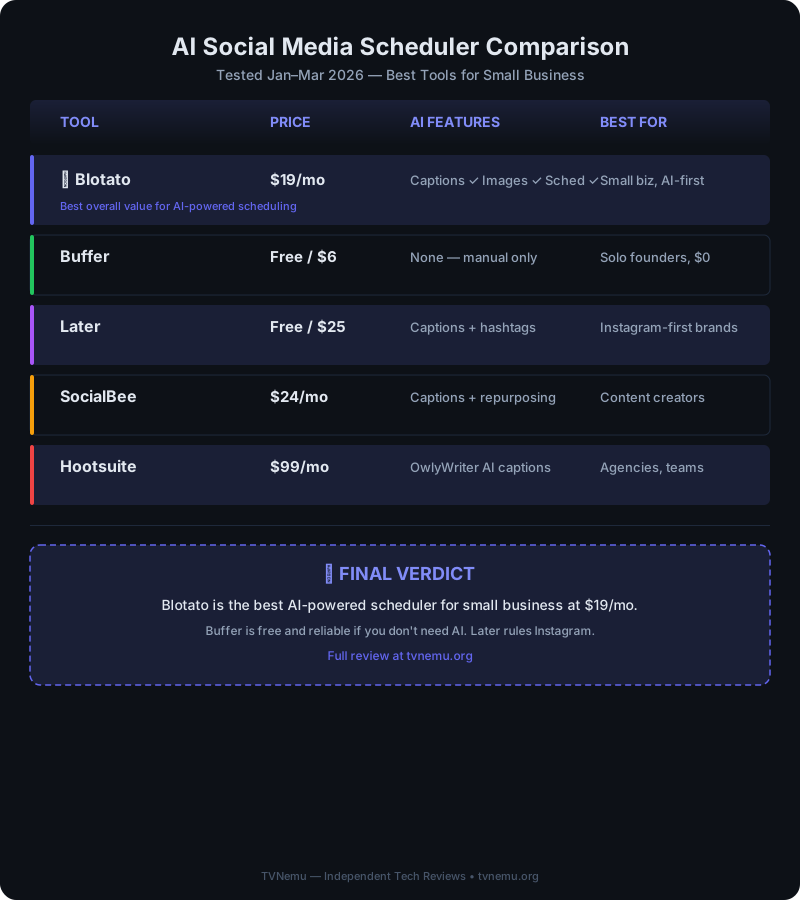
| Tool | Starting Price | AI Features | Accounts | Best For |
|---|---|---|---|---|
| Blotato | $19/mo | Captions, images, scheduling | 5 | Small businesses wanting AI help |
| Buffer | Free / $6/mo | None | 3 (free) | Solo founders on $0 budget |
| Later | Free / $25/mo | Captions + hashtags | 1 (free) | Instagram-first visual brands |
| SocialBee | $24/mo | Content repurposing, captions | 5 | Repurposing an existing content library |
| Hootsuite | $99/mo | OwlyWriter AI captions | 10 | Small agencies managing multiple brands |
| Sprout Social | $249/mo | Full AI insights + publishing | Unlimited | Established teams with dedicated social roles |
Blotato — Best AI Features for the Price
Price: $19/mo (Starter) | Platforms: Instagram, Facebook, X, LinkedIn, TikTok | Trial: 7 days
Blotato is a relatively new tool — you won’t see it alongside Buffer and Hootsuite in every roundup. What sets it apart is that AI content generation is the core feature, not an upsell. You give it a topic or a link, and it generates platform-optimized captions with hashtags. It also creates basic images and carousels.
What worked:
– Batch creation from a single URL is useful for cross-posting.
– Image generation can create simple social graphics.
– $19/mo for 5 accounts is competitive — most competitors start at $25+ for AI features.
What didn’t:
– It’s a newer product with a smaller user base. Documentation is thinner than Buffer or Hootsuite.
– Analytics are basic. You get engagement numbers but no competitive benchmarking.
Bottom line: If you’re fine being an early adopter and want AI to handle caption writing, Blotato offers practical AI features per dollar. If you need a proven, boring tool, stick with Buffer.
Buffer — Reliable, Simple, Free
Price: Free / $6/mo (Essentials) | Platforms: 3 (free) | AI: None
Buffer is the no-drama option. No AI, no gimmicks, no upsell popups. You connect your accounts, write your post, pick a time, and it goes live. The free tier (3 accounts, 30 posts/channel) has no expiration — one of the few genuine free plans left in SaaS.
What worked:
– Free plan is honest. No trial gating, no feature-crippled demo.
– Browser extension for link sharing.
What didn’t:
– No AI. In 2026, that means more manual work. You write everything yourself.
– Instagram support has limitations: No Reels scheduling on free, no carousel creation.
– Analytics show numbers but no recommendations.
Bottom line: Buffer is the right choice when your social media strategy is “post link + short comment” and you want it done cheaply. For anyone who dreads writing captions, it’s worth paying for an AI tool instead.
Later — Best Visual Planner
Price: Free (limited) / $25/mo (Growth) | Platforms: Instagram-first | AI: Captions + hashtags on paid plans
Later started as an Instagram scheduler and still does Instagram best. Its visual content calendar — drag-and-drop to arrange your grid — is a strong feature.
What worked:
– Visual feed preview for brands that care about aesthetics.
– AI captions on the Growth plan are competent.
– Hashtag suggestions are platform-informed.
– Link-in-bio feature for Instagram traffic without a landing page.
What didn’t:
– Instagram-first means Facebook, LinkedIn, and X have less focus.
– Free plan is restrictive: 1 profile, 10 posts.
– No image generation. You still need Canva or similar.
Bottom line: If your business lives on Instagram and visual aesthetics drive your strategy, Later’s $25/mo is money well spent. If you need multi-platform support, look at Blotato or SocialBee.
SocialBee — Best for Content Repurposing
Price: $24/mo | Platforms: 5 | AI: Captions + repurposing
SocialBee uses a category-based model: you create content buckets (blog posts, tips, offers, quotes) and set posting ratios. The AI rewrites a single piece of content into multiple social variations and posts them on a schedule.
What worked:
– Category system for evergreen content.
– AI repurposing: paste a blog URL, get 5-7 social variations.
– Content library lets you recycle top-performing posts.
What didn’t:
– Setup requires upfront effort.
– Interface hasn’t had a major refresh in a couple of years.
– No native image or graphic creation.
Bottom line: SocialBee works best if you already have a steady stream of content (blog posts, YouTube videos, podcasts) and want to squeeze more mileage out of them. For scratch creation, Blotato is easier.
Hootsuite — Powerful, but for Whom?
Price: $99/mo (Team) | Platforms: 10 | AI: OwlyWriter captions
Hootsuite does everything — schedule, monitor, engage, advertise, analyze — at a price that makes sense for teams and agencies, not solopreneurs.
What worked:
– Comprehensive feature set. More integrations than any competitor.
– OwlyWriter AI generates captions from URLs.
– Approval workflows and user roles for 3+ person teams.
What didn’t:
– $99/mo for the Team plan is expensive. The Professional plan is $249/mo.
Bottom line: If you’re running social for multiple clients or brands, Hootsuite earns its price. If you’re a 1-2 person business, you’re paying for features you won’t use.
Sprout Social — Enterprise-Grade
Price: $249/mo (Standard) | Platforms: Unlimited | AI: Full suite
Sprout Social is the premium option. Excellent analytics, smart scheduling, AI-powered content suggestions — but priced for companies with a social media budget.
Bottom line: The best tool here if you can justify the cost. Most small businesses cannot. Consider it only if your social presence directly drives revenue.
How to Choose
Posting 3-5 times/week on 1-2 platforms? → Buffer free plan. Simple, reliable, costs $0.
Struggling with caption writing? → Blotato. Its AI writing is genuinely useful for someone who’d rather do anything else than write social copy.
Instagram is your main channel? → Later’s $25/mo plan.
Running multiple brands or clients? → Hootsuite Team ($99/mo). The multi-account management is worth the premium.
Already have a blog or YouTube channel? → SocialBee. Its repurposing workflow gets more mileage from existing content.
FAQ
Is Blotato a legitimate tool?
Yes. It’s a newer entry in the social scheduling space (launched in late 2025), built specifically for AI-powered content creation. It’s less established than Buffer or Hootsuite. As with any newer SaaS tool, evaluate it against your workflow before committing long-term.
Which free social media scheduler is best?
Buffer’s free plan is the most generous: 3 accounts, unlimited time. Later’s free plan is too restrictive (1 profile, 10 posts). SocialBee and Blotato don’t offer free tiers — just trials.
Can I schedule TikTok posts?
Most tools support TikTok scheduling, but the implementation varies. Blotato has better TikTok support than most. Buffer and Hootsuite also support it on paid plans. Later only added TikTok in 2025 and it’s still catching up.
How much time does an AI scheduler actually save?
A tool like Blotato can save time mostly by writing caption drafts and suggesting hashtags, but the actual scheduling still takes a few minutes. Treat it as a way to speed up the work, not a complete replacement, and measure the saving on your own posting schedule.
Does Blotato work with Canva?
Blotato generates images internally (simple social graphics, carousels). If you use Canva for more complex designs, you can upload the finished image and schedule it through Blotato, but there’s no direct integration.
Final Verdict
For a small business in 2026, the choice comes down to how much AI help you want.
If you want AI to write your captions: Blotato at $19/mo is the most cost-effective option. The captions are effective, multi-platform support covers what most businesses need, and it can offer time savings.
If you just need scheduling: Buffer free plan is hard to beat. No AI, no fuss, no cost.
If Instagram visuals define your brand: Later’s visual planner is worth $25/mo.
There’s no one-size-fits-all in social media scheduling. But for a small business owner who’d rather spend time on their actual product than on writing captions — Blotato is worth a trial.
Prices and features may change — check each provider’s website for current information.
Pingback: Best Social Media Scheduling Tools in 2026: 6 Picks Ranked – TVNemu