
Disclosure: Some of the links in this review are affiliate links. If you sign up through them, we may earn a commission at no extra cost to you. Our opinions remain unbiased.
Contabo has built a reputation as the budget king of VPS hosting. Founded in 2003 in Munich, Germany, the company has grown into one of the largest private hosting providers in Europe — all while maintaining prices that look almost too good to be true.
Let’s find out: is Contabo’s cheap VPS actually worth it in 2026, or do you get what you pay for?
Contabo Cloud VPS Plans & Pricing
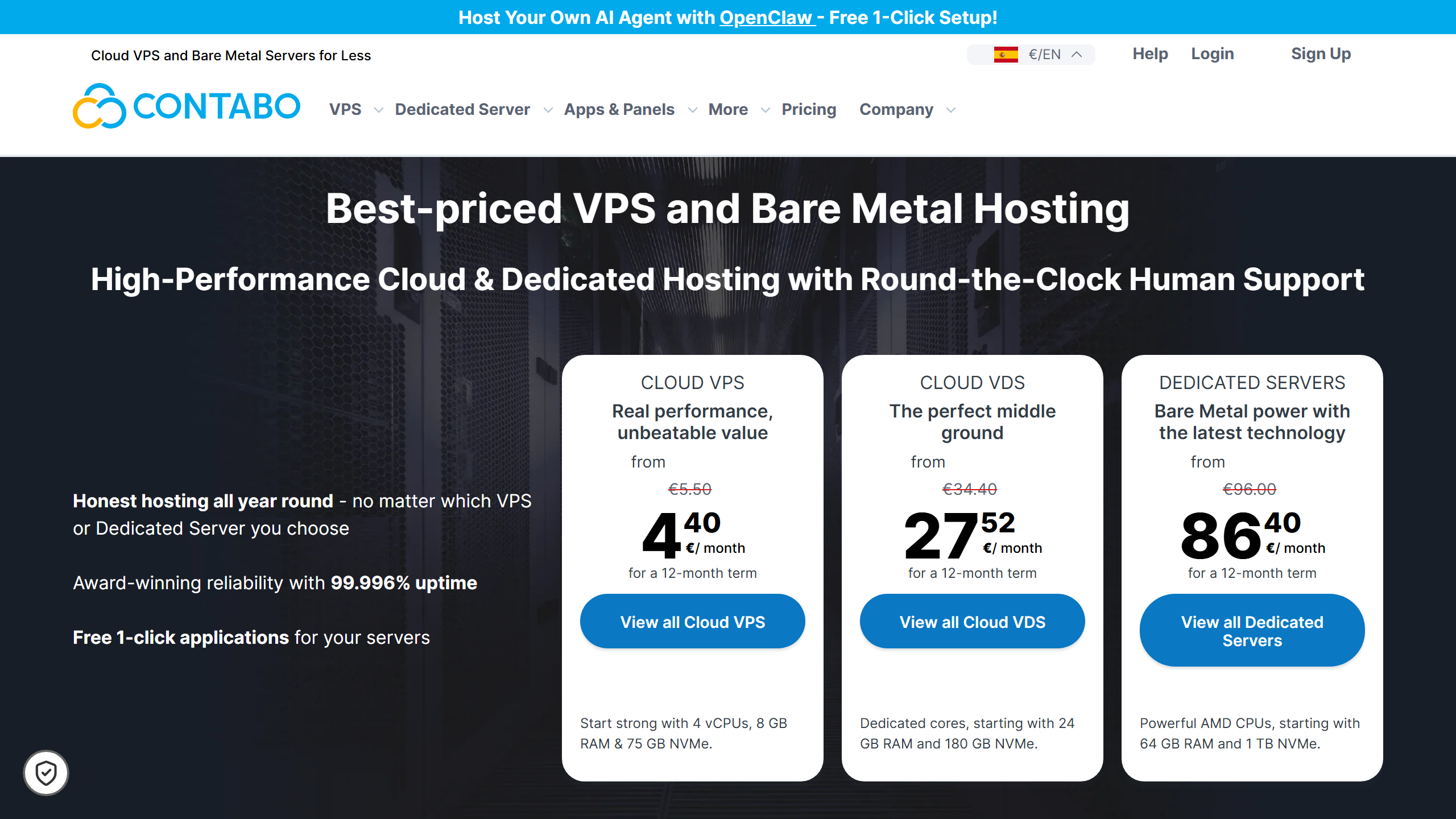
Contabo’s Cloud VPS line starts with these plans:
| Plan | vCPU | RAM | Storage | Price per month (24-month term) |
|---|---|---|---|---|
| Cloud VPS 4 | 4 cores | 8 GB | 100 GB SSD | €4.40 |
| Cloud VPS 6 | 6 cores | 12 GB | 200 GB SSD (or 100 GB NVMe) | €6.00 |
| Cloud VPS 8 | 8 cores | 24 GB | 300 GB SSD (or 150 GB NVMe) | €11.20 |
Prices as listed on contabo.com in October 2026, in euros, for a 24-month subscription. The amount shown can include or exclude VAT depending on your country, so check the total at checkout. Larger plans (Cloud VPS 12, 16 and 18) are also available.
All plans include:
- Full root / Administrator access
- Choice of Linux distros (Ubuntu, Debian, CentOS, Rocky, Alma, Fedora, openSUSE) + Windows Server (extra $)
- DDoS protection (basic tier included)
- Free SSL certificates via acme.sh
- Automated daily backups (available as add-on)
The pricing is aggressive. the entry plan, Cloud VPS 4, gives you 4 vCPU cores, 8 GB RAM and 100 GB SSD from €4.40/month.
Performance: What to Expect
CPU
Contabo uses Intel Xeon and AMD EPYC processors depending on the data center.
Analysis: Expect CPU performance that is adequate for most workloads — web hosting, app servers, databases, and media streaming. It is generally considered slower than Linode or Hetzner’s modern AMD EPYC instances. If you need heavy number-crunching (video transcoding, rendering, high-traffic databases), you may notice the difference. These are general characteristics of budget providers, not measurements of our own.
Disk I/O
Analysis: Expect decent SSD performance for a budget provider. Not NVMe-fast (like Hostinger or Hetzner’s newer instances), but more than enough for typical web hosting, CMS platforms, and Git repositories. If you’re running heavy databases, consider adding extra RAM for caching.
Network Speed
Analysis: Some users report intermittent network congestion. This is a common compromise with budget providers — oversubscribed network uplinks. For most users, it won’t be noticeable. For real-time applications (gaming servers, VoIP), it might be.
Uptime
Contabo does not publish an uptime guarantee like DigitalOcean’s or Linode’s 99.99% SLAs, so treat it as a budget provider and keep your own backups.
Contabo Control Panel
Unlike many providers that use custom-built panels, Contabo’s Customer Control Panel (CCP) is a clean, functional web interface. It handles:
- Server management (start, stop, reboot, rebuild)
- OS reinstallation
- ISO mounting
- Firewall rules
- Snapshots and backups
- Billing and invoicing
It’s not as polished as DigitalOcean’s droplet dashboard or Linode’s Cloud Manager. The UI feels a bit “enterprise-corporate” rather than modern. But it works well enough.
Getting Started: Setting Up Your First Contabo VPS
Here’s what the signup and deployment process looks like, based on Contabo’s documentation.
Signup and Verification
Contabo requires identity verification for new accounts — a photo of your ID or passport, plus a selfie. This is more strict than DigitalOcean (which just needs a credit card), but it’s a one-time step and it’s common among European hosting providers for fraud prevention.
Deploying a Server
Once verified, deploying a VPS is straightforward:
- Go to the Cloud VPS section in the CCP
- Pick your plan
- Choose a data center — Contabo has locations in the US (St. Louis, Seattle, New York), Europe (Munich, Nuremberg), and Asia (Singapore)
- Select your operating system — Contabo lists Ubuntu, Debian, Rocky Linux and Windows Server images
- Set a root password + optional SSH key
You get an email with the IP address and DNS PTR record is pre-configured.
First SSH Login
ssh root@your-server-ip
What We’d Change
- The password must be set during deployment; SSH key upload comes as a secondary option. Most developers prefer key-only auth from the start.
- No one-click app marketplace (like DigitalOcean’s 1-click WordPress or Docker droplets). You install everything manually.
- The firewall in the CCP is basic — allow/deny by port and IP. No WAF or DDoS profiles like Cloudflare integration.
For experienced users, these aren’t dealbreakers. Beginners might find the lack of guided setups frustrating.
Long-Term Reliability
Pros and Cons of Contabo
✅ Pros
| Pro | Details |
|---|---|
| Unbeatable value | 8 GB RAM + 100 GB SSD from €4.40/mo — hard to match at this price. |
| Generous storage | The base plan includes 100 GB SSD and the next plan 200 GB. Good for media, backups, or file hosting. |
| Windows VPS available | Most budget providers don’t offer Windows at this price point. |
| Global data centers | US (3), EU (3), Asia (1) — good geographic spread. |
❌ Cons
| Con | Details |
|---|---|
| CPU performance | Older processor generations; slower than Hetzner or Linode counterparts. |
| Network congestion | Occasional packet loss during peak hours in some locations. |
| Support speed | Ticket-based support. No live chat on lower plans. |
| No NVMe on base plans | Standard SATA SSDs, not NVMe. Hostinger and Hetzner offer NVMe at similar price points. |
| Control panel dated | Functional but not as user-friendly as DigitalOcean or Linode. |
Is Contabo Right for You?
Use Contabo for:
- Staging & development environments — The generous RAM and storage make it perfect for running multiple containers or VMs.
- Personal websites & blogs — More than enough power for WordPress, Ghost, or static sites.
- File/Media servers — generous storage per euro is good for hosting files or streaming media.
- Learning & experimentation — Cheap enough to spin up and break without worrying about cost.
- Small business websites — Handles moderate traffic without breaking a sweat.
Look elsewhere if:
- You need maximum CPU performance — Go with Hetzner or Linode for faster processors.
- Uptime is mission-critical — DigitalOcean or Vultr offer better SLAs.
- You need responsive 24/7 support — Contabo’s support is adequate, not exceptional.
- Your audience is in Asia — Only one data center in Singapore with limited capacity.
Contabo vs. The Competition
| Feature | Contabo | Hetzner | DigitalOcean | Hostinger |
|---|---|---|---|---|
| Base Price | €4.40 | €3.99 | $4.00 | $5.99 |
| Base RAM | 8 GB | 2 GB | 512 MB | 2 GB |
| Base Storage | 100 GB SSD | 10 GB | 10 GB | 40 GB NVMe |
| Uptime SLA | None | 99.9% | 99.99% | 99.9% |
| Support | Ticket | Ticket | Ticket + Chat | Live Chat |
FAQ: Contabo VPS
Is Contabo actually reliable?
For the price, yes. Not enterprise-grade (that would be 99.95%+), but perfectly acceptable for dev environments, personal projects, and small business sites. The occasional packet loss during peak hours is the main trade-off for the low price.
Why is Contabo so cheap compared to DigitalOcean or AWS?
Contabo owns its data centers in Germany rather than renting colocation space. They also use slightly older hardware (Intel Xeon from 2017-2019 instead of the latest AMD EPYC), and their support is ticket-based rather than 24/7 live chat. These savings get passed on to you. The downside: you won’t get NVMe storage or the latest CPUs.
Does Contabo charge hidden fees?
No. The price you see is the price you pay. VAT is added for EU customers (19% in Germany). Windows Server licenses cost extra, and automated daily backups are an optional add-on. Everything else is included in the base price.
Can I host multiple websites on one Contabo VPS?
Absolutely. With 8 GB RAM and 100 GB of SSD storage on the base plan, you can run a LEMP stack with several small-to-medium WordPress sites. Use Docker or separate system users to keep sites isolated. For heavy WooCommerce or membership sites, jump to a larger plan for more RAM.
Which Contabo data center should I choose?
Pick the one closest to your audience. US West Coast → Seattle. US East → New York. Central US → St. Louis. Europe → Munich or Nuremberg (both perform similarly). Asia Pacific → Singapore. You can test latency with Contabo’s looking glass tool before ordering.
Is Contabo good for game servers?
It depends on the game. Minecraft, Valheim, and Terraria servers work well on the smaller plans — the generous RAM is a big plus for modded Minecraft. For competitive FPS games (CS2, Valorant) where latency matters, occasional network jitter could be frustrating. A provider with better network consistency like Hetzner is a better fit for competitive gaming.
Final Verdict: ⭐ 8.2/10
Contabo delivers exactly what it promises: cheap VPS hosting with shockingly generous resources. If you value RAM and storage per dollar above all else, no provider beats them. The service is reliable enough for most use cases — with the caveat that CPU performance and network consistency aren’t top-tier.
From €4.40/month, you get a server that handles WordPress, Node.js, Docker containers, and moderate-traffic applications without complaint. It’s not the right choice for high-performance production workloads, but for everything else, it’s an incredible deal.
Bottom line: Contabo is the best cheap VPS for users who want maximum specs at minimum cost. If that sounds like you, give them a try.